Key takeaways
- Find clients faster: Global Client Search is now available from any screen in your Strategist Portal.
- Simplify client management: Invited, onboarding, and connected clients are now organized in one consolidated view.
- More flexibility for members: Clients can access Currence through the Member Web Experience on any device.
- More enhancements ahead: These updates establish the foundation for future client insights and portal improvements.
Managing your clients on Currence just got easier. We’ve introduced several enhancements to the Strategist Portal designed to streamline client management, reduce unnecessary steps, and give you a clearer view of your clients’ progress.
Here’s a look at what’s new:
1. Global client search
You can now search for any client profile directly from the top-right navigation of your Strategist Portal, no matter which page you’re viewing.
Previously, client search was only available from your dashboard or Clients tab. This update reduces extra clicks and makes it faster to find the client information you need.
Log in here to get started.
2. One consolidated view of your clients
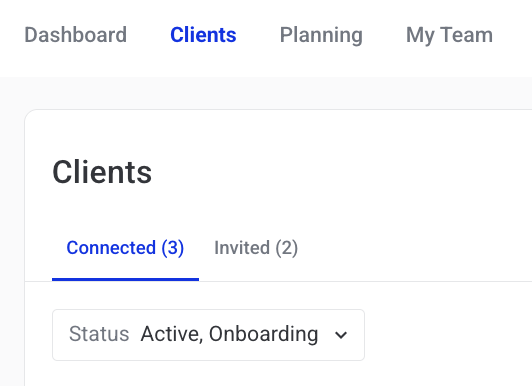
We’ve brought Invited, Onboarding, and Active Clients together under a single Clients section.
From here, you can:
- Invite new clients directly through the Invite Client button.
- Track each client’s onboarding status.
- View active Reservoirs under the Connected section.
- Find pending invitations under the Invited section.
This consolidated experience makes it easier to understand where every client is in their Currence journey and manage your client relationships from one place. It also lays the groundwork for future insights and reporting enhancements.
Log in here to get started.
3. Access Currence from any device
As a reminder, your clients can access their Currence experience from desktop, tablet, or mobile. The Member Web Experience allows clients to log in and manage their Currence accounts directly through a browser.
Clients can access the web experience at member.livecurrence.com.
These enhancements are part of our ongoing commitment to making Currence easier to use and helping Strategists manage their clients more efficiently.
We’re continuing to build on the Strategist Portal experience, with additional tools and insights planned for future releases.
Have feedback or suggestions for future enhancements? We’d love to hear from you!
Looking for more planning tools? The Planning section of your Strategist Portal and additional features are exclusively available to Certified Income Advisors (CIAs). Explore upgrading your plan to access these resources.